Skip to content
Migraday

Migraday Headache and migraine diary

Your headache diary

Headache? One tap on “I have a headache” and it’s logged. When it’s over, tap again. That’s all it takes to keep track of your months, with a summary ready for your doctor.

For iPhone with iOS 17 or later. English and Dutch.

  • No account
  • Data on your iPhone
  • Calm, dark screen
9:41

Today

Tuesday 10 November

6 days without a headache
Go ahead, try the button.

How it works

As little effort as possible

When your head hurts, you don’t want to type. So Migraday asks as little as possible, and you fill in the rest whenever it suits you.

  1. 1

    One tap when it starts

    Tap “I have a headache” in the app, on the widget or with Siri. Then choose what kind of headache it is. You name it yourself; the app doesn’t diagnose.

    Migraine Other headache Don’t know
  2. 2

    One question each evening

    In the evening the app asks: “Did you have a headache today?” No or yes, nothing more. Forgot? Then it asks about yesterday in the morning.

    Did you have a headache today?

    No Yes
  3. 3

    A summary for your doctor

    Create a tidy headache summary for the period you choose, as a PDF to print or email. With counts per month, a calendar and your medication.

Features

Your months at a glance

Everything you enter comes back in a calendar, in counts and in widgets. No conclusions: what it means is something to discuss with your doctor.

Calendar

Every day gets a colour: green for no headache, yellow, orange or red for how bad it was. A lightning bolt for migraine and a dot for medication.

Insights

Premium

How many headache and migraine days you had each month, on which days and at what times they started, how long they lasted and how often you took medication. Only counts, no causes.

Widgets

Log a headache without opening the app. On your Home Screen and Lock Screen, with the daily question or your whole month.

I have a headache

6 days without a headache

“I have a headache” Free
Widget asking “Did you have a headache today?” with No and Yes buttons (shown in Dutch)
Daily question Premium
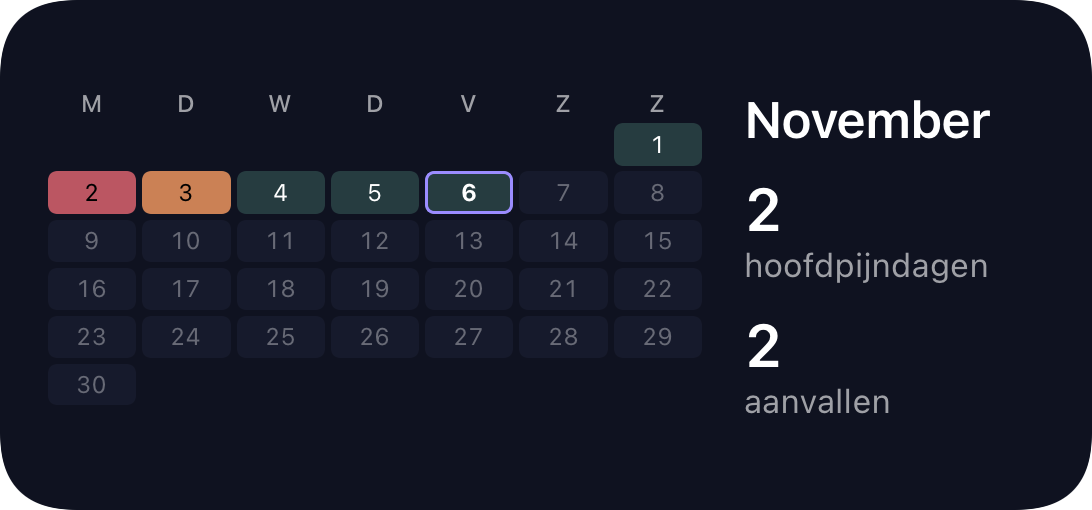
Widget with the November calendar and the number of headache days (shown in Dutch)
Month calendar Premium

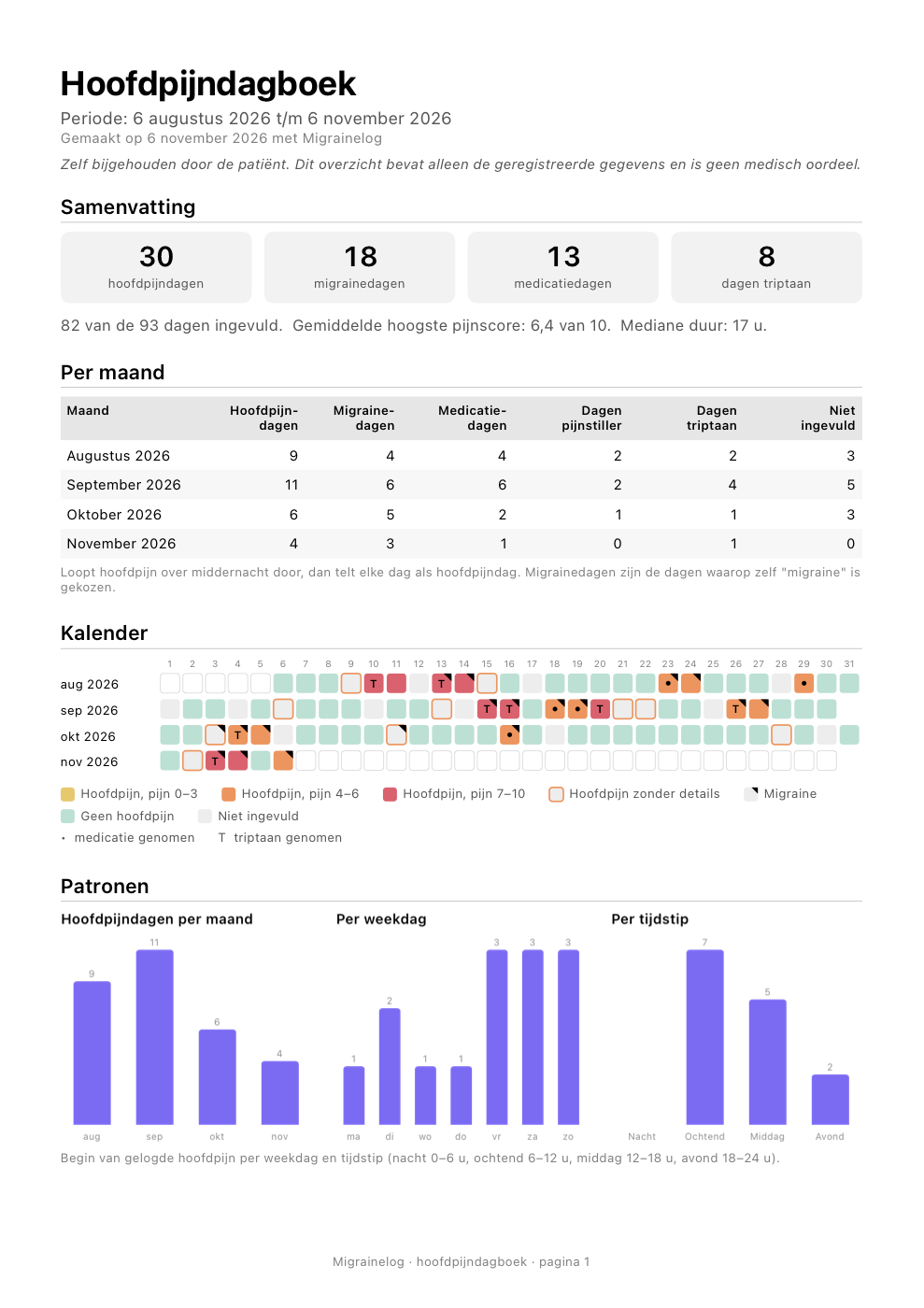
Headache summary for your doctor

Premium

An A4 summary with an overview, a table per month, a headache calendar, symptoms, medication and a list of everything you logged. No conclusions: only what you entered yourself.

View an example (PDF)
First page of an example headache summary (in Dutch)

And also

Medication

Your own list of painkillers and triptans. After taking something, note whether it helped.

Siri and Shortcuts

“I have a headache in Migraday”. Works with the Action button too.

Live Activity

Premium

An ongoing headache with timer and stop button on your Lock Screen and in the Dynamic Island.

Food, drink and factors

Premium

Sleep, stress, caffeine, a skipped meal: tap them per day, on days without a headache too.

Apple Health

Premium

Menstruation and sleep from Health in your calendar and summary. Read only.

Export

All your data as a CSV file for Excel or Numbers.

Privacy

Your diary stays yours

Headaches are about your health. That’s why Migraday has no account and no server of its own. We can’t see what you enter.

Read the privacy policy
  • On your iPhone

    Your diary lives on your own device.

  • In your own iCloud

    If you like: a backup in your own iCloud, so it’s on a new iPhone too.

  • No account

    No email address, no password, no sign-in.

  • Health: read only

    Menstruation and sleep are shown, not stored and not shared.

A diary, not a doctor

Migraday keeps track of what you enter and adds it up. The app deliberately gives no medical advice, no warnings and no predictions. Worried about your headaches or your medication? Talk to your GP or neurologist.

Free and Premium

Start for free, go Premium when you want more

Keeping track of headaches is free, with no limits. Premium adds the summary for your doctor, your iCloud backup and more.

Free

Everything to keep track

  • Log headaches with one tap
  • Calendar with monthly counts
  • Keep track of medication
  • “I have a headache” widget
  • Siri and Shortcuts
  • The daily question every evening
  • Export as CSV

Premium

Everything in Free, plus

  • Headache summary (PDF) for your doctor
  • Back up to iCloud
  • Food, drink and other factors per day
  • Insights and charts
  • Apple Health: menstruation and sleep
  • Your own symptoms and factors
  • Extra widgets: daily question, overview, month calendar
  • Live Activity
  • Lock with Face ID
  • Alternative app icons

As a yearly subscription or a one-time purchase

You’ll see the price in the app.

Questions

Frequently asked questions

Is Migraday free?
Yes. Logging headaches, the calendar, medication, the widget, Siri, the daily question and CSV export are free, with no limits. Premium is a yearly subscription or a one-time purchase and adds the headache summary, iCloud backup and charts, among other things.
Do I need an account?
No. Open the app and start right away. There’s no sign-in and we don’t ask for an email address.
Where is my data stored?
On your iPhone. With Premium you can keep a backup in your own iCloud, so it’s also on a new or second iPhone or iPad. We have no server and can’t access your diary.
What’s the difference between “Migraine” and “Other headache”?
You choose that yourself, every time. Not sure? Choose “Don’t know”. The app doesn’t diagnose; it only helps you keep track of what you call it.
Does the app give advice or warnings?
No, deliberately not. Migraday counts what you enter and shows it. There are no warnings, advice or predictions. Questions about your headaches or medication are for your doctor.
What if I forget a day?
In the morning the app asks whether you had a headache yesterday, if that day is still empty. And you can always add a headache afterwards, with time, pain and medication.
Can I give the summary to my doctor?
Yes, with Premium you create a headache summary as a PDF for the period you choose. Print it, email it or save it. With the free CSV export you can also open your data in Excel or Numbers.
Which languages does the app support?
English and Dutch. The app follows your iPhone’s language, including dates and the headache summary.

Can’t find your question? Go to support

Start keeping track today

One tap when you have a headache, one question each evening. The app does the rest.

Download on the App Store

For iPhone with iOS 17 or later. English and Dutch.